forgiveness, digital collageFriday, January 29, 2010
Forgiveness
forgiveness, digital collagePosted by Elizabeth Parsons at Friday, January 29, 2010 2 comments
Labels: digital collage, PhotoShop
Wednesday, January 20, 2010
The life so short
Posted by Elizabeth Parsons at Wednesday, January 20, 2010 2 comments
Labels: PhotoShop
Tuesday, January 19, 2010
An old barn in my town
This old barn is near my home. It's falling down. I stopped today and took two pictures of it before it's gone. There is a new development going up right next to it; I am concerned that 'they' might take it down or it may fall down. So I took pictures before it is gone. I then brought one of the photos into Photo shop and created this digital collage. I added the bird on barbed wire to give it more of a rural look.
And to think I live a little over 50 miles from Manhattan! I love barns. I've decided that I will photograph as many of the barns in my town this coming year. There are many still standing.
Posted by Elizabeth Parsons at Tuesday, January 19, 2010 1 comments
Labels: PhotoShop
Sunday, January 17, 2010
An American Beauty
I am not finished with this duotone. It feels 'not done' to me. I'll have to mull it over and find a good word or saying to fit. My sister took the image at my daughter's wedding.
Posted by Elizabeth Parsons at Sunday, January 17, 2010 2 comments
Labels: PhotoShop
Friday, January 15, 2010
Thursday, January 14, 2010
she is having a baby

Posted by Elizabeth Parsons at Thursday, January 14, 2010 0 comments
Labels: PhotoShop
Wednesday, January 13, 2010
always use sunscreen
always use sunscreen, digital collageThis month I will be posting lots and lots of digital art from DJ Pettitts online workshop I am taking. I am really enjoying the community and online meeting of gear-heads from all over the world. Great fun!
Posted by Elizabeth Parsons at Wednesday, January 13, 2010 2 comments
Tuesday, January 12, 2010
Monday, January 11, 2010
The tree shades my soul
Posted by Elizabeth Parsons at Monday, January 11, 2010 0 comments
Labels: PhotoShop
Sunday, January 10, 2010
fools like me
fools like me (click to enlarge)Another image created in DJ Pettitt's online workshop. The eye candy in this workshop is staggering...so much fun!! And it lasts the whole month of January :)
Posted by Elizabeth Parsons at Sunday, January 10, 2010 0 comments
Labels: PhotoShop
Saturday, January 9, 2010
Shout to the full moon
I am having a blast in DJ Pettitt's online workshop. It has created in me an obsession for all things digital. I find myself going through my massive digital collection to find images to use in the exercises.
I am loving the mix of using my own art work with photoshop to create new digital art.
Posted by Elizabeth Parsons at Saturday, January 09, 2010 2 comments
Labels: PhotoShop
Tuesday, January 5, 2010
DJ Pettitt's online Photoshop class
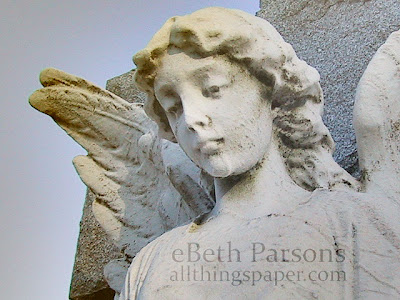
So many joined the class! There is lots of back and forth discussion, beautiful images and I am seeing several familiar faces there. Below are two images from Exercise #1 - the before and the after of the same image. I look forward to learning more!
I've always admired DJ's digital work and so it's a real treat to learn her process and techniques!
I'll use this image and keep building on it as I learn more...
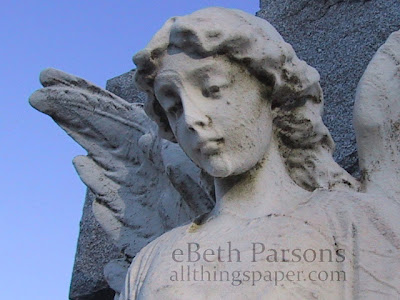
exercise #1 is complete see how I cleaned up her nose?
I love how the angel has a more surreal, ethereal look to it now.
Posted by Elizabeth Parsons at Tuesday, January 05, 2010 0 comments
Labels: online course, PhotoShop
Friday, January 1, 2010
watercolor
Using Illustrator and Photo shop with watercolor brushes, I made what I think is a pretty good 'watercolor' painting. I'll keep messing around to tweak this some...I want it to be more painterly. And I want to add some textured background to for interesting contrast.
Posted by Elizabeth Parsons at Friday, January 01, 2010 2 comments
Labels: PhotoShop
Sunday, December 27, 2009
photoshop fun
Posted by Elizabeth Parsons at Sunday, December 27, 2009 0 comments
Labels: PhotoShop
Saturday, July 18, 2009
daffodil
watercolor on 140# Fabriano hot press paper
watercolor run through a photo shop filterPosted by Elizabeth Parsons at Saturday, July 18, 2009 2 comments
Labels: PhotoShop, watercolor art painting
Wednesday, July 8, 2009
analog meets digital
I sat down today to continue my 'blue series' of paintings and boats. As usual, I veered WAY OFF of the path.
As I thought about the words I had glued down to the paper, I decided I wanted to paint an allegory about life. (the ephemera is from an 1867 primer.) Me being the boat, life being the sea. I also decided that I wanted to paint a 'real' boat, not a simple stamped version. I painted an old-time wooden yacht in the ocean. Once I finished the little painting, I scanned it in and then added digital elements with Photo shop. The bottom image is the combined version. I like how it turned out.
Posted by Elizabeth Parsons at Wednesday, July 08, 2009 1 comments
Labels: digital art, PhotoShop, watercolor
Friday, April 24, 2009
Photoshop - product backdrops

Posted by Elizabeth Parsons at Friday, April 24, 2009 1 comments
Labels: PhotoShop
Sunday, December 7, 2008
The magic of Photo Shop
original scan
I've added some Photo shop magic to this little snowman collage. Each has it's own charm. The original is clean and crisp. The photo shopped one has depth and looks more vintage now.
What do you think?
Posted by Elizabeth Parsons at Sunday, December 07, 2008 0 comments
Tuesday, November 11, 2008
photoshop brushes
I can waste more time messing around with PS brushes! Here is a vintage photo of a sweet little angel girl-the first photo. Then I added brushes. The third photo is another photo with brushes and multi layers. As it is almost 1 am, I really need to get to bed!
untouched photo
Posted by Elizabeth Parsons at Tuesday, November 11, 2008 0 comments
Labels: PhotoShop
Sunday, March 23, 2008
still playing with photoshop

Here is a very cool brush effect. Brushes are handy photoshop tools. Almost anything can be made into a brush. Once something is made into a brush, it's there for you to use over and over again. There are thousands of free brushes all over the Internet for free download. The actual brush is the filmstrip. I then added my art of four different cupcakes I created.
After I added the images, I then desaturated the image to create the black and white negative effect. Warning- this is addictive!
Posted by Elizabeth Parsons at Sunday, March 23, 2008 0 comments